
AED onboarding guide
This guide provides step-by-step instructions for onboarding customers to create and use AED accounts through the Lorum platform.
Overview
Note: Before starting the onboarding make sure that the Customer is Approved/Auto-approved first.
The AED onboarding is a synchronous flow and is completed immediately, so it is not necessary to rely on onboarding webhooks for this particular process.
It is consistent across customer types and follows a 2-step flow for both:
- Individual Customers
- Business Customers
Individual Customer Onboarding
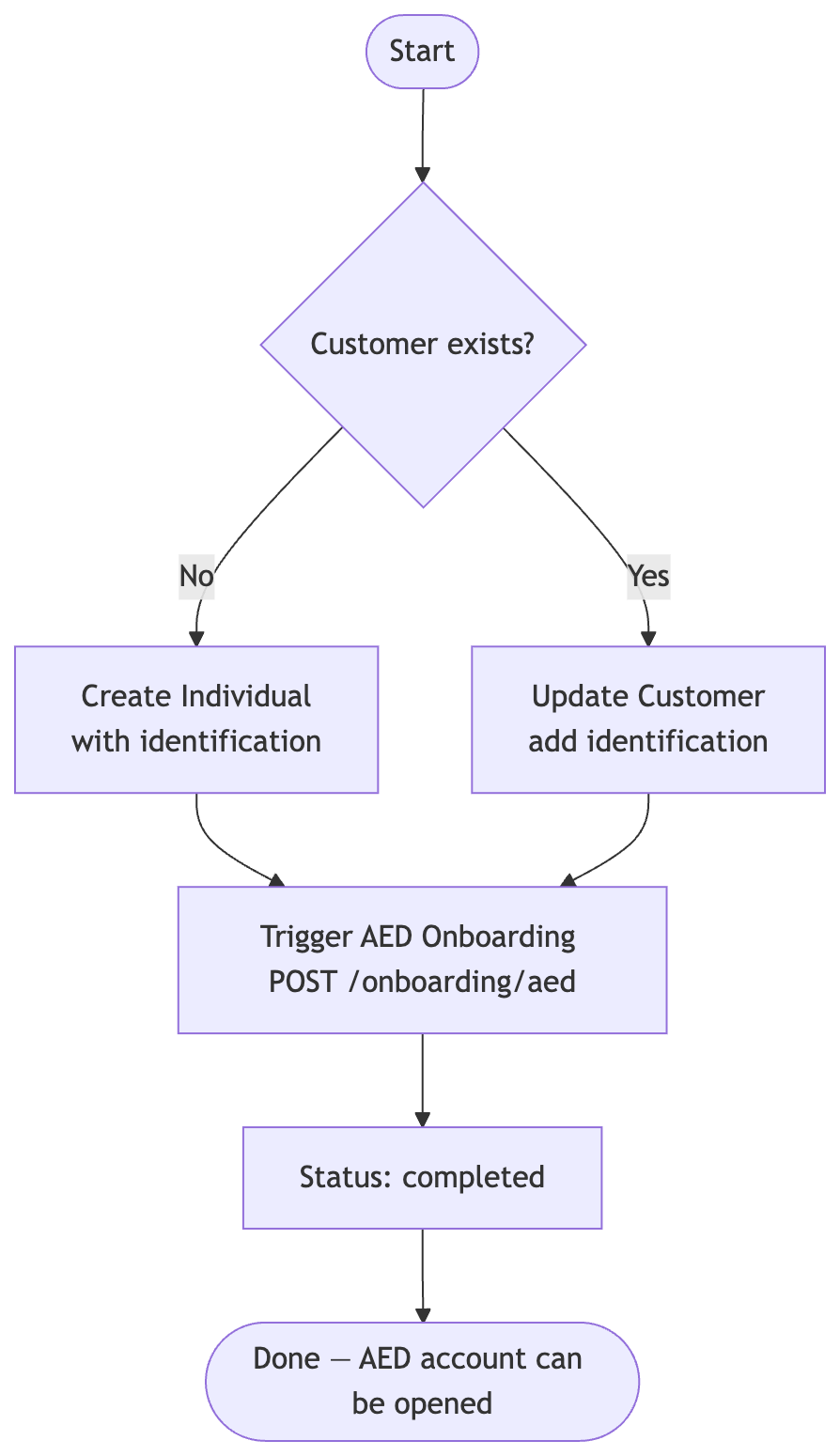
Step 1: Provide Identification Data
For individual customers, details of their identification document must be provided before AED onboarding can be triggered.
For New Customers
Create a new individual customer with identification using the Add Individual API.
Include the identification field in your request:
{
  "display_name": "John Doe",
  "first_name": "John",
  "last_name": "Doe",
  "date_of_birth": "1990-01-01",
  "nationality": "GB",
  "reference": "your-reference",
  "address": { "line_1": "123 Main St", "country_code": "GB" },
  "identification": {
    "type": "passport",
    "number": "AB1234567",
    "expiry_date": "2030-01-01",
    "country_of_issuance": "GB"
  }
}
Accepted identification types:
type | Description |
|---|---|
passport | Passport requires number, expiry_date, country_of_issuance |
national_id | Emirates ID (UAE national ID) requires number, expiry_date, country_of_issuance. Only accepted when country_of_issuance is AE |
Note:
national_idis only supported for UAE - Emirates ID. Requests withcountry_of_issuanceother thanAEwill be rejected with a400error.
For Existing Customers
Update the existing customer profile to add the identification using the Update Customer API:
{
  "individual": {
    "identification": {
      "type": "passport",
      "number": "AB1234567",
      "expiry_date": "2030-01-01",
      "country_of_issuance": "GB"
    }
  }
}
Step 2: Trigger Onboarding
Once identification is provided, initiate the onboarding process:
POST /v1/customers/{customer_id}/onboarding/aed
Onboarding completes immediately. You can confirm by checking the status:
GET /v1/customers/{customer_id}/onboarding/aed
Expected response:
{
  "customer_id": "...",
  "currency": "AED",
  "status": "completed"
}
Error Codes
| Code | Cause | Fix |
|---|---|---|
missing_currency_data | No identification on the individual | Add identification via Update Customer and retry |
Business Customer Onboarding
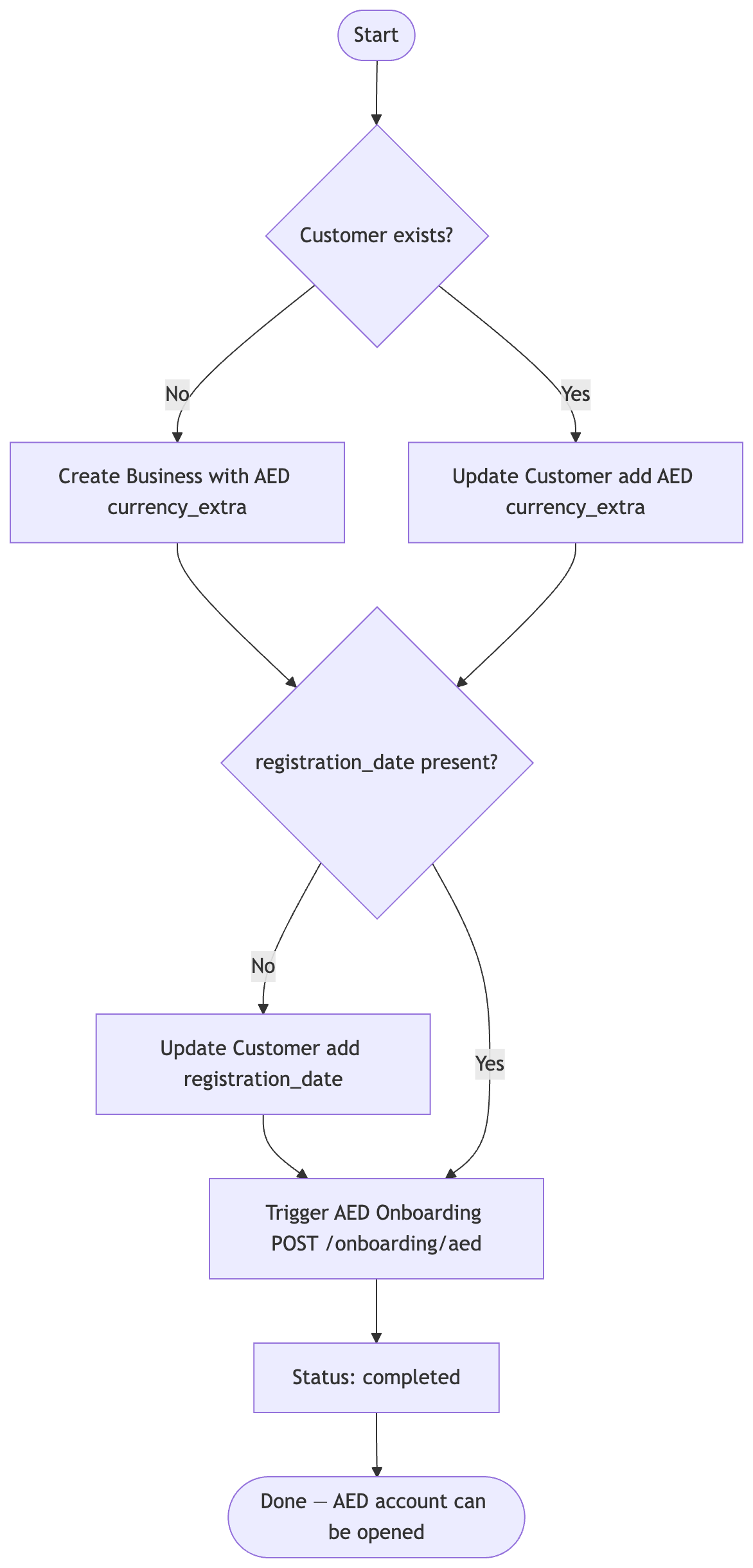
Step 1: Provide AED Currency Data
For business customers, two fields must be provided before AED onboarding can be triggered:
currency_extra- an AED entry withlicense_issueris required. Formainlandandfreezonebusinesses,trade_license_expiryis also required. Forinternationalbusinesses,trade_license_expiryis not required.registration_date- the business registration/incorporation date is required for AED onboarding. This field is optional in general but becomes mandatory when onboarding for AED.
For New Customers
Create a new business customer with AED-specific information using the Add Business API:
{
  "display_name": "Acme LLC",
  "reference": "your-reference",
  "address": { "line_1": "123 Business Ave", "country_code": "AE" },
  "business_name": "Acme LLC",
  "registration_number": "REG123456",
  "registration_date": "2020-06-01",
  "country_of_issuance": "AE",
  "currency_extra": [
    {
      "currency": "aed",
      "license_issuer": "international"
    }
  ]
}
Accepted license_issuer values:
| Value | Description | trade_license_expiry |
|---|---|---|
mainland | Registered with the UAE mainland authority | Required |
freezone | Registered in a UAE free zone | Required |
international | Registered outside the UAE | Not required |
For Existing Customers
Update the existing customer profile using the Update Customer API:
{
  "business": {
    "registration_date": "2020-06-01",
    "currency_extra": [
      {
        "currency": "aed",
        "license_issuer": "mainland",
        "trade_license_expiry": "2027-06-01"
      }
    ]
  }
}
{
  "business": {
    "registration_date": "2020-06-01",
    "currency_extra": [
      {
        "currency": "aed",
        "license_issuer": "mainland"
      }
    ]
  }
}
Step 2: Trigger Onboarding
Once all required data is in place, initiate the onboarding process:
POST /v1/customers/{customer_id}/onboarding/aed
Onboarding completes immediately. Confirm by checking the status:
GET /v1/customers/{customer_id}/onboarding/aed
Expected response:
{
  "customer_id": "...",
  "currency": "AED",
  "status": "completed"
}
Error Codes
| Code | Cause | Fix |
|---|---|---|
missing_currency_data | No AED block in currency_extra | Add AED currency_extra via Update Customer and retry |
business_registration_date_missing | registration_date is missing on the business | Add registration_date via Update Customer and retry |
Support
For additional assistance or questions about the AED onboarding process:
- Consult the full API documentation at https://docs.lorum.com
- Contact technical support for integration issues
Updated 3 months ago