
EUR & GBP onboarding Guide
This guide provides step-by-step instructions for onboarding customers to create and use EUR and GBP accounts through the Lorum platform.
Overview
EUR and GBP onboarding does not require any currency_extra fields. All required data comes from the customer record already stored in the system.
Both individual and business onboarding complete synchronously. A webhook is dispatched on completion.
Validation Rules
The following character restrictions apply to all name and address fields for both individual and business customers.
Allowed Characters
- Letters:
a–z,A–Z - Digits:
0–9 - Symbols:
/ - ? : ( ) . ' + - Spaces (not as the first character)
Restrictions
- Maximum 35 characters per field
- The first character must be a letter, digit, or one of
/ ? ( ) . ' +- it cannot be-,:, or a space
Fields Validated
| Field | Who | Required |
|---|---|---|
display_name | Individual & Business | Yes |
first_name | Individual | Yes |
last_name | Individual | Yes |
address.line_1 | Individual & Business | Yes |
address.line_2 | Individual & Business | Yes |
Top shareholder first_name | Business only | Yes |
Top shareholder last_name | Business only | Yes |
Individual Customer Onboarding
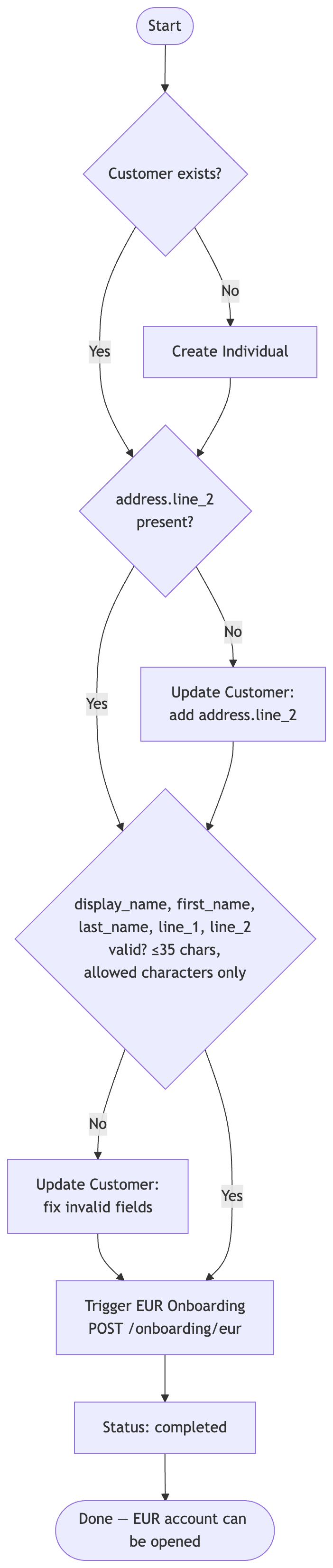
Step 1: Create or Verify the Customer
No currency-specific fields are required. A valid individual customer record is all that is needed.
Required fields for EUR/GBP onboarding:
| Field | Notes |
|---|---|
display_name | Max 35 chars, see Validation Rules |
first_name | Max 35 chars, see Validation Rules |
last_name | Max 35 chars, see Validation Rules |
address.line_1 | Max 35 chars, see Validation Rules |
address.line_2 | Max 35 chars, see Validation Rules - required for all customers |
For New Customers
Create a new individual customer using the Add Individual API. Include address.line_2:
{
  "display_name": "Jane Smith",
  "first_name": "Jane",
  "last_name": "Smith",
  "date_of_birth": "1990-01-01",
  "nationality": "GB",
  "reference": "your-reference",
  "address": {
    "line_1": "123 Main Street",
    "line_2": "Flat 4",
    "country_code": "GB"
  }
}
For Existing Customers
Add or fix any missing or invalid fields via the Update Customer API:
{
  "individual": {
    "address": {
      "line_1": "123 Main Street",
      "line_2": "Flat 4",
      "country_code": "GB"
    }
  }
}
Step 2: Trigger Onboarding
Once the customer data is in place, initiate the onboarding process:
POST /v1/customers/{customer_id}/onboarding/eur
No request body is required. Onboarding completes immediately. Confirm by checking the status:
GET /v1/customers/{customer_id}/onboarding/eur
Expected response:
{
  "customer_id": "...",
  "currency": "EUR",
  "status": "completed"
}
Error Codes
| Code | Cause | Fix |
|---|---|---|
invalid_customer_address | address.line_2 is missing, or line_1/line_2 contains invalid characters or exceeds 35 chars, see Validation Rules | Add/fix address fields and retry |
invalid_customer_name | display_name, first_name, or last_name contains invalid characters or exceeds 35 chars, see Validation Rules | Update name fields and retry |
Business Customer Onboarding

Step 1: Create or Verify the Customer
Business customers require two things before EUR/GBP onboarding can be triggered:
- At least one shareholder - the business must have shareholders on record
address.line_2- required for all customers
Required fields for EUR/GBP onboarding:
| Field | Notes |
|---|---|
display_name / business_name | Max 35 chars, see Validation Rules |
address.line_1 | Max 35 chars, see Validation Rules |
address.line_2 | Max 35 chars, see Validation Rules - required for all customers |
| At least one shareholder | Shareholder with highest holding_percentage is validated |
Top shareholder first_name | Max 35 chars, see Validation Rules |
Top shareholder last_name | Max 35 chars, see Validation Rules |
Shareholder Validation
The shareholder with the highest holding_percentage is selected and their first_name and last_name are validated against the rules in the Validation Rules section above. There is no minimum holding percentage threshold - any positive value qualifies.
For New Customers
Create a new business customer using the Add Business API. Include at least one shareholder and address.line_2:
{
  "display_name": "Acme Ltd",
  "reference": "your-reference",
  "business_name": "Acme Ltd",
  "registration_number": "12345678",
  "country_of_issuance": "GB",
  "address": {
    "line_1": "123 Business Avenue",
    "line_2": "Canary Wharf",
    "country_code": "GB"
  },
  "shareholders": [
    {
      "first_name": "John",
      "last_name": "Doe",
      "holding_percentage": 100
    }
  ]
}
For Existing Customers
Update via the Update Customer API:
{
  "business": {
    "address": {
      "line_1": "123 Business Avenue",
      "line_2": "Canary Wharf",
      "country_code": "GB"
    },
    "shareholders": [
      {
        "first_name": "John",
        "last_name": "Doe",
        "holding_percentage": 100
      }
    ]
  }
}
Step 2: Trigger Onboarding
Once all required data is in place, initiate the onboarding process:
POST /v1/customers/{customer_id}/onboarding/eur
No request body is required. Onboarding completes synchronously. Confirm by checking the status:
GET /v1/customers/{customer_id}/onboarding/eur
Expected response:
{
  "customer_id": "...",
  "currency": "EUR",
  "status": "completed"
}
Error Codes
| Code | Cause | Fix |
|---|---|---|
no_shareholders | No shareholders on the business record | Add at least one shareholder via Update Customer and retry |
invalid_customer_address | address.line_2 is missing, or line_1/line_2 contains invalid characters or exceeds 35 chars, see Validation Rules | Add/fix address fields and retry |
invalid_customer_name | display_name or business_name contains invalid characters or exceeds 35 chars, see Validation Rules | Update business name and retry |
invalid_shareholder_name | Top shareholder's first_name or last_name contains invalid characters or exceeds 35 chars, see Validation Rules | Update shareholder name and retry |
GBP Onboarding
The GBP onboarding flow is identical to EUR. Substitute eur with gbp in all endpoint paths:
POST /v1/customers/{customer_id}/onboarding/gbp
GET  /v1/customers/{customer_id}/onboarding/gbp
All requirements, validations, and error codes are the same.
Support
For additional assistance or questions about the EUR/GBP onboarding process:
- Consult the full API documentation at https://docs.lorum.com
- Contact technical support for integration issues
Updated 17 days ago