
USD Onboarding - API
Learn how to onboard individual and business customers to USD via the Lorum API, including document upload and shareholder requirements.
USD onboarding is asynchronous and requires document uploads. Individual customers follow a 3-step flow; business customers follow a 4-step flow and must have at least one USD-onboarded individual shareholder before starting.
Webhook: To receive onboarding status updates through webhooks, enable the Onboarding event category in the Lorum portal under Settings → App. Once enabled, your integration will receive webhook notifications when onboarding statuses change.
Provide Currency-Specific Data (Both Customer Types)
New individual - include USD-specific fields in Add Individual:
POST /v1/customers/individuals
New business - include USD-specific fields in Add Business:
POST /v1/customers/businesses
Existing customer (either type) - update via Update Customer:
PATCH /v1/customers/{customer_id}
Individual Customer
Follow the steps below to onboard an individual customer to USD.
Upload & Link Required Documents
Upload each document via Upload Document :
POST /v1/documents
Link it to the customer via Link Document:
POST /v1/customers/{customer_id}/documents
For a complete list of required documents, see Individual Customer Onboarding Requirements.
Trigger Onboarding
Once all documents are uploaded and linked, initiate onboarding via Onboard Customer:
POST /v1/customers/{customer_id}/onboarding/usd
Business Customer
Follow the steps below to onboard an business customer to USD.
Prerequisites: Identify and Onboard Ultimate Beneficiary Owners
Before starting, identify all individuals who collectively hold 51% or more ownership of the business. Each must be fully USD-onboarded as an individual (steps 1–3 above) before being added as a shareholder.
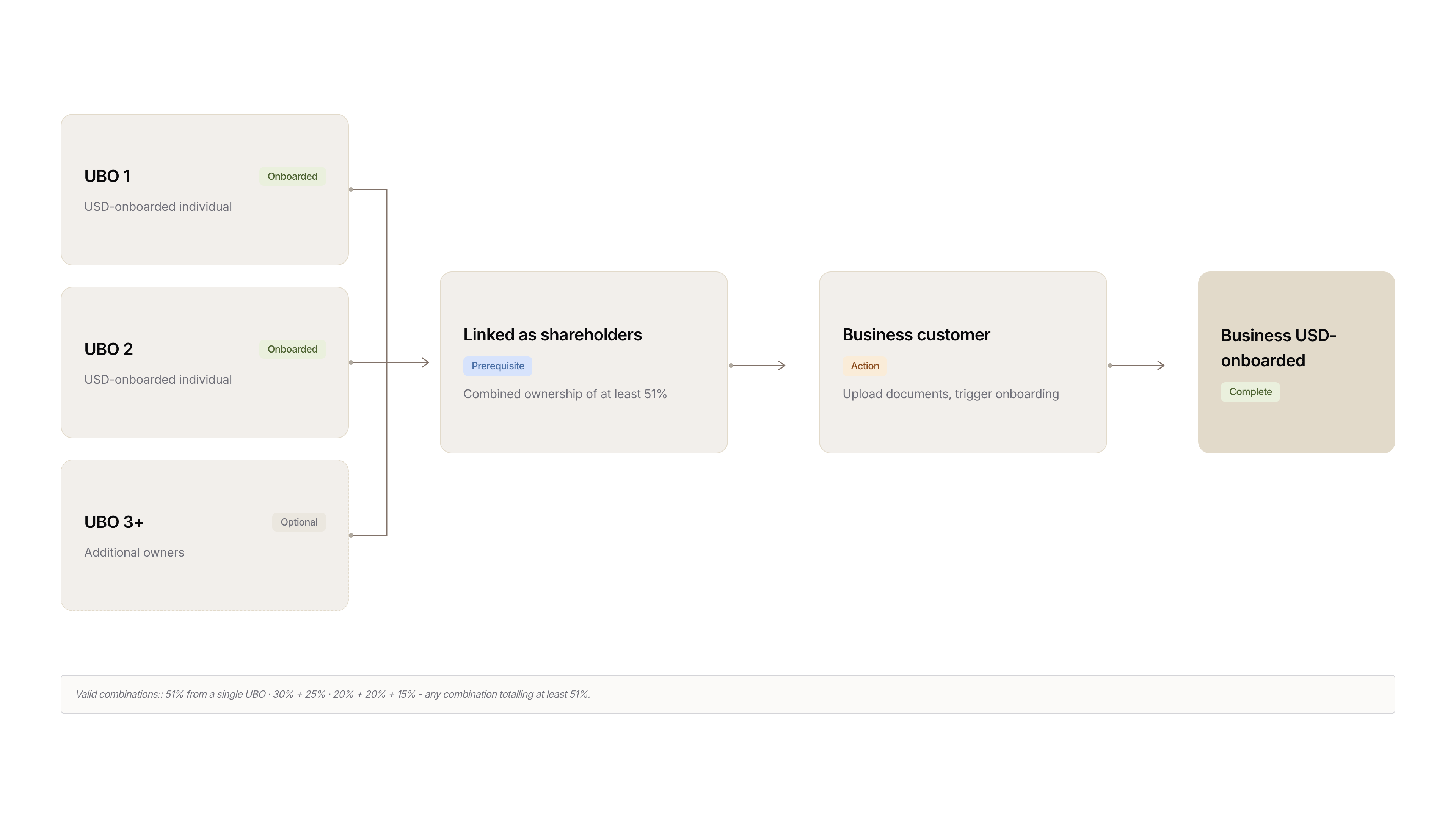
Add USD-Onboarded Shareholder(s)
Each shareholder must be created in Lorum as an Individual Customer, approved and onboarded to USD.
Add each UBO via Add Shareholder
POST /v2/customers/businesses/{business_id}/shareholders
Upload and Link Required Documents
Upload each document via Upload Document :
POST /v1/documents
Link it to the customer via Link Document:
POST /v1/customers/{customer_id}/documents
For a complete list of required documents, see Business Customer Onboarding Requirements.
Trigger Onboarding
Once all documents are uploaded and linked, initiate onboarding via Onboard Customer:
POST /v1/customers/{customer_id}/onboarding/usd
Verification & Approval (Both Customer Types)
USD onboarding is reviewed asynchronously. Once approved, you will receive an onboarding.completed webhook and the customer's onboarding status will update to completed.
You can confirm the status via Get Customer Onboarding Status:
GET /v1/customers/{customer_id}/onboarding/usd
Updated 3 months ago